Elevating Professional Identity with Strategic Email Signature Templates for Business
In the modern digital landscape, email remains the cornerstone of professional communication. While much attention is paid to the body of the message, the footer often serves as the final impression left on a recipient. A well-crafted Email Signature Template for Business does more than simply provide contact details; it acts as a digital business card, a branding tool, and a subtle marketing channel. For professionals ranging from corporate executives to freelance creators, the signature block is an underutilized asset that can significantly enhance credibility and drive engagement.
The evolution of the email signature has moved far beyond the simple "Sent from my iPhone" or a plain text name and title. Today, organizations and individuals recognize the value of integrating visual identity, social proof, and actionable links into this small real estate. Whether utilizing a standardized Email Signature Template for Business across a large enterprise or designing a unique Creative Email Signature Template for a personal brand, the goal remains consistent: to communicate professionalism and facilitate connection.
The Strategic Value of Standardized Business Signatures
For established companies and growing startups, consistency is paramount. Implementing a unified Email Signature Template for Business ensures that every outgoing message reinforces the company's brand identity. When employees send emails using disparate formats, fonts, and logo variations, it can dilute the brand's perceived professionalism. A centralized template solves this by dictating specific hex codes for colors, approved font families, and the correct placement of logos.
Beyond aesthetics, standardization offers practical advantages in legal compliance and information accuracy. Many industries require specific disclaimers regarding confidentiality or regulatory adherence to be included in every correspondence. A robust business template embeds these legal necessities automatically, reducing the risk of human error. Furthermore, when staff members leave or change roles, updating a central template ensures that outdated titles or phone numbers do not linger in active circulation, maintaining the integrity of the organization's contact data.
Consider the scenario of a sales team reaching out to potential clients. If each representative uses a different signature style, the company appears fragmented. However, when every member utilizes a cohesive Email Signature Template for Business, it projects an image of a well-oiled machine. This uniformity builds trust, suggesting that the company pays attention to detail in all aspects of its operations, not just its product delivery.
Unlocking Creativity for Independent Professionals
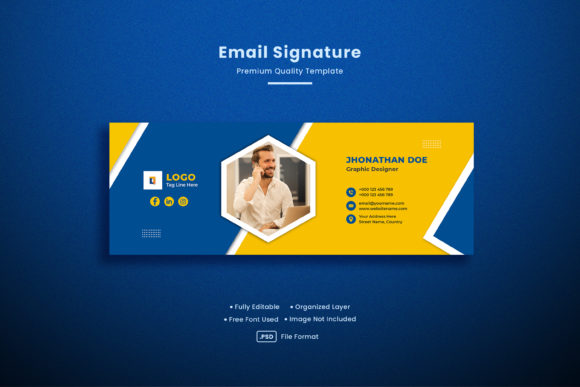
While corporations benefit from uniformity, independent professionals, artists, and consultants often thrive on distinctiveness. For these users, a Creative Email Signature Template serves as a canvas to express personality and showcase portfolio work. Unlike the rigid structures required by large enterprises, creative templates allow for the integration of dynamic elements such as headshots, custom illustrations, or links to recent projects.
A graphic designer, for instance, might include a thumbnail of their latest work directly in the signature, turning every email into a mini-portfolio review. Similarly, a content creator could embed icons linking to their YouTube channel, podcast, or newsletter. The key here is balance; a creative signature must remain functional and load quickly across various email clients. Overloading a signature with heavy images or complex code can result in broken layouts or messages being flagged as spam.
The advantage of a Creative Email Signature Template lies in its ability to humanize digital interactions. In a world dominated by text-based communication, a warm photo or a splash of color can make the sender feel more approachable and memorable. This is particularly valuable for freelancers and solopreneurs who rely on personal relationships to secure repeat business. By carefully curating the elements within their signature, they can guide recipients toward their most important conversion goals, whether that is booking a consultation or viewing a case study.
Essential Components of an Effective Signature
Regardless of whether the approach is strictly corporate or highly creative, certain core components are universal to an effective signature. These elements ensure that the recipient has all the necessary information to respond or connect further without friction.
- Name and Title: Clearly state who you are and your role within the organization. Ambiguity here can lead to confusion regarding authority and scope.
- Contact Information: Include a direct phone number and physical address if relevant. Ensure these are clickable links for mobile users.
- Company Logo: A high-resolution, appropriately sized logo reinforces brand recognition. It should link back to the company homepage.
- Social Media Icons: Small, unobtrusive icons linking to professional profiles like LinkedIn or industry-specific platforms allow recipients to verify credentials and expand their network.
- Call to Action (CTA): This is where strategy meets execution. A CTA might invite the reader to read a latest blog post, register for a webinar, or download a whitepaper.
When constructing an Email Signature Template for Business, it is crucial to prioritize hierarchy. The name should be the most prominent element, followed by the title and then the contact details. Visual weight should be used to guide the eye naturally through the information. Clutter is the enemy of effectiveness; white space is just as important as the content itself.
Technical Considerations and Compatibility
One of the most significant challenges in deploying email signatures is the fragmentation of email clients. Outlook, Gmail, Apple Mail, and mobile applications all render HTML differently. A signature that looks pristine in a web browser may appear broken on a smartphone or in a desktop client. Therefore, the technical construction of any Email Signature Template for Business must rely on table-based HTML layouts rather than modern CSS flexbox or grid systems, which are poorly supported in email environments.
Images present another hurdle. Many email clients block external images by default to protect user privacy. If a signature relies entirely on an image for contact information, the recipient may see a blank box. To mitigate this, critical text such as names and phone numbers must be coded as live text, not embedded within an image file. Additionally, hosting images on reliable servers with proper alt tags ensures that even if images are blocked, the context remains clear.
Mobile responsiveness is non-negotiable. With a significant portion of emails opened on smartphones, signatures must be tested on smaller screens. Long horizontal layouts often fail on mobile devices, forcing users to scroll sideways. A vertical stack or a responsive design that adjusts based on screen width ensures readability regardless of the device used.
Implementing Signatures Across an Organization
Rolling out a new Email Signature Template for Business across an entire organization requires careful planning and management. Manual implementation, where each employee copies and pastes code into their settings, is prone to error and inconsistency. As the team grows, maintaining these signatures becomes unsustainable.
Many organizations turn to cloud-based signature management solutions. These platforms allow IT administrators to design, deploy, and update signatures centrally. When a change is needed—such as updating a holiday hours notice or changing a marketing campaign link—the administrator makes the update once, and it propagates to every user's outgoing mail instantly. This level of control ensures that the Email Signature Template for Business remains current and aligned with broader marketing initiatives.
Furthermore, these tools often provide analytics. Businesses can track how many clicks a specific banner in the signature receives, offering valuable data on customer interest and campaign performance. This transforms the passive signature into an active marketing instrument, providing ROI metrics that justify the investment in professional design and management tools.
Balancing Aesthetics with Deliverability
While the visual appeal of a signature is important, it must never compromise email deliverability. Spam filters analyze the ratio of text to images, the presence of suspicious links, and the overall code structure. An overly graphic-heavy Creative Email Signature Template might trigger these filters, causing legitimate business emails to land in the junk folder.
To maintain high deliverability rates, keep the file size of images small, limit the number of hyperlinks, and avoid using URL shorteners which are often flagged by security systems. The content of the signature should also be relevant and professional. Excessive promotional language or all-caps text can raise red flags. The ideal signature strikes a balance: visually engaging enough to capture attention but clean and text-heavy enough to satisfy spam algorithms.
In conclusion, the email signature is a powerful yet often overlooked component of digital communication strategy. Whether adhering to a strict Email Signature Template for Business for corporate cohesion or leveraging a Creative Email Signature Template to highlight individual flair, the underlying principles of clarity, consistency, and technical soundness remain the same. By treating the signature as a strategic asset rather than an afterthought, professionals and organizations can enhance their brand perception, improve communication efficiency, and unlock new avenues for engagement in every message they send.